amberlin-inspector
A proxy for developers that sits between a program and a model server and records what went in and what came out: the request, the prompt, the raw output, the timings and token counts.
- Status
- Working
- Package
- amberlin-inspector
- Licence
- AGPL-3.0-or-later
- Built with
- GoOpenAI APISGLang
- Part of
- Amberlin AI
- Source
- amberlin-inspector
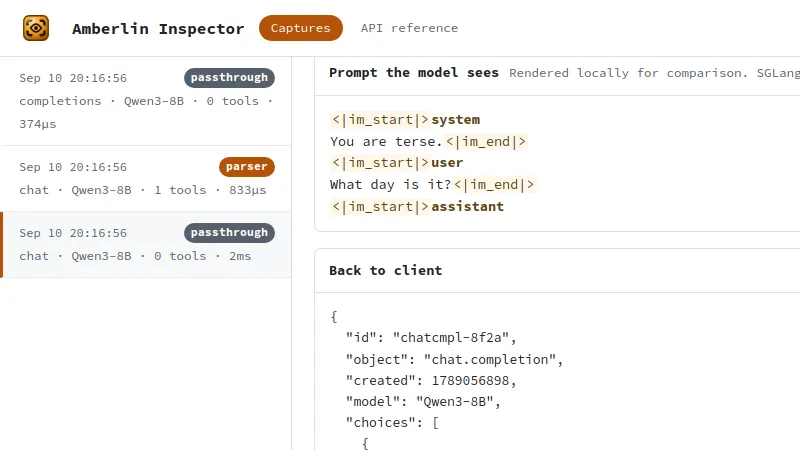
When a model answers strangely, the question is what it was actually given. amberlin-inspector sits between a client and a server that speaks the OpenAI API, such as SGLang, and records every exchange: the request, the prompt after its template, the raw output, the response, any error, and the timings and token counts.
By default the server applies the template out of sight, and the inspector
shows its own rendering of it beside the exchange. It can also take over the
template: with ?parser=hermes or ?parser=xml it renders the prompt itself
and parses the model’s tool calls back, so what it shows is exactly what the
model got, and a template problem can be told apart from a model problem. Each
exchange is reduced to five figures that answer most latency questions: prompt
tokens, completion tokens, total time, time to first byte, and how many tokens
the server found already cached.
It leaves out load balancing, failover and routing by model name on purpose, because each of those would make a recording something other than what really happened.
A live page at http://127.0.0.1:5191/ shows the captures as they arrive. It
listens on this machine only, and refuses to start on any other address.
Amberlin Settings has a Capture switch that routes Amberlin’s questions
through it, for as long as you want to watch.
It is a tool for working on the assistant rather than for using it, so it does
not start at login: amberlin-inspector serve, or the menu entry, when you
need it.
Install
Once the Amber Linux archive is set up (it takes three commands, on the packages page):
sudo apt install amberlin-inspector