amberlin-tools
A local tool server that gives the language model real facts instead of letting it guess: the time, the disks, the processes, your files and notes, the weather.
- Status
- Working
- Package
- amberlin-tools
- Licence
- AGPL-3.0-or-later
- Built with
- bubblewrapGoJSON SchemaOpenAPI
- Part of
- Amberlin AI
- Source
- amberlin-tools
Asked for the time, a language model will make one up. amberlin-tools gives it
a way to look instead: a small server of typed tools, each with a schema the
model can read, answering over plain HTTP and JSON on 127.0.0.1:5190. The
broker offers them to whichever model is answering, runs the calls the model
asks for and hands the results back, so an answer about your disk is about your
disk. elektron offers them too.
The tools come in four groups:
- Reading this machine: the time and date arithmetic, time zones, a
calculator and unit conversion, files and folders you have allowed, the
Ambrosia store, and one
system_readingtool with thirteen readings, from uptime and memory to open ports, packages and services. - Changing this machine: new files, notes in Ambrosia, and git.
- Reading the web: the weather, from Open-Meteo. Web search and fetching a page are there but off until you turn them on.
- Making things: a picture, once an image server is configured.
Careful by default
The server runs inside a bubblewrap sandbox: the filesystem is read-only, your home folder is hidden, and only the folders you allow, plus Amberlin’s own Documents, Pictures and Videos folders, are visible. It will not start without bubblewrap unless you say so. Writing a file only ever creates a new one unless you switch read-only off, unknown arguments are refused, and a failed call is logged by tool and status, never with its text. The server’s own requests to the web go through a client that refuses to reach addresses it should not.
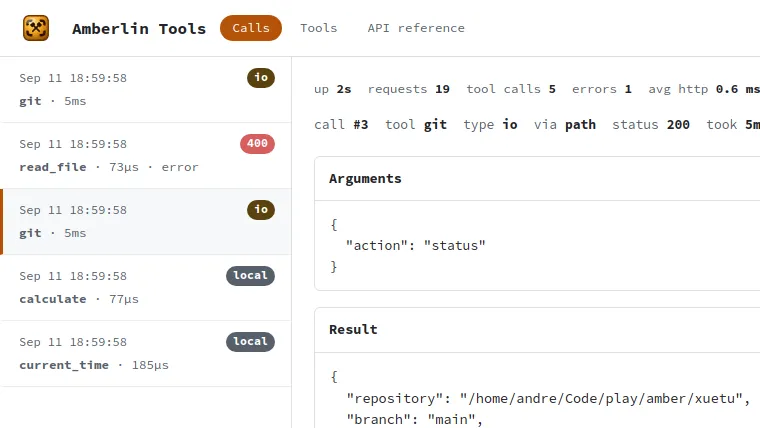
Open http://127.0.0.1:5190/ to watch the calls as they happen: which tool,
the arguments, the answer and how long it took. It is the quickest way to see
why an answer came out the way it did. The same page lists the tools and the
API, which is also served as OpenAPI.
Underneath, each tool is a plain typed Go function with its JSON Schema, in a registry behind a thin HTTP layer, so an MCP front could sit beside the HTTP one without touching the tools.
Install
Once the Amber Linux archive is set up (it takes three commands, on the packages page):
sudo apt install amberlin-tools