Copal
A desktop overlay where one keypress lays your newest notes, bookmarks and clips from Ambrosia across the screen, magnified under the pointer, and searchable.
- Package
- copal
- Licence
- Amber Source License, GPL-3.0-or-later from 1 May 2033
- Built with
- CairoOdinX11
- Part of
- Amberlin AI
- Source
- copalMost are private for now; access is free on request.
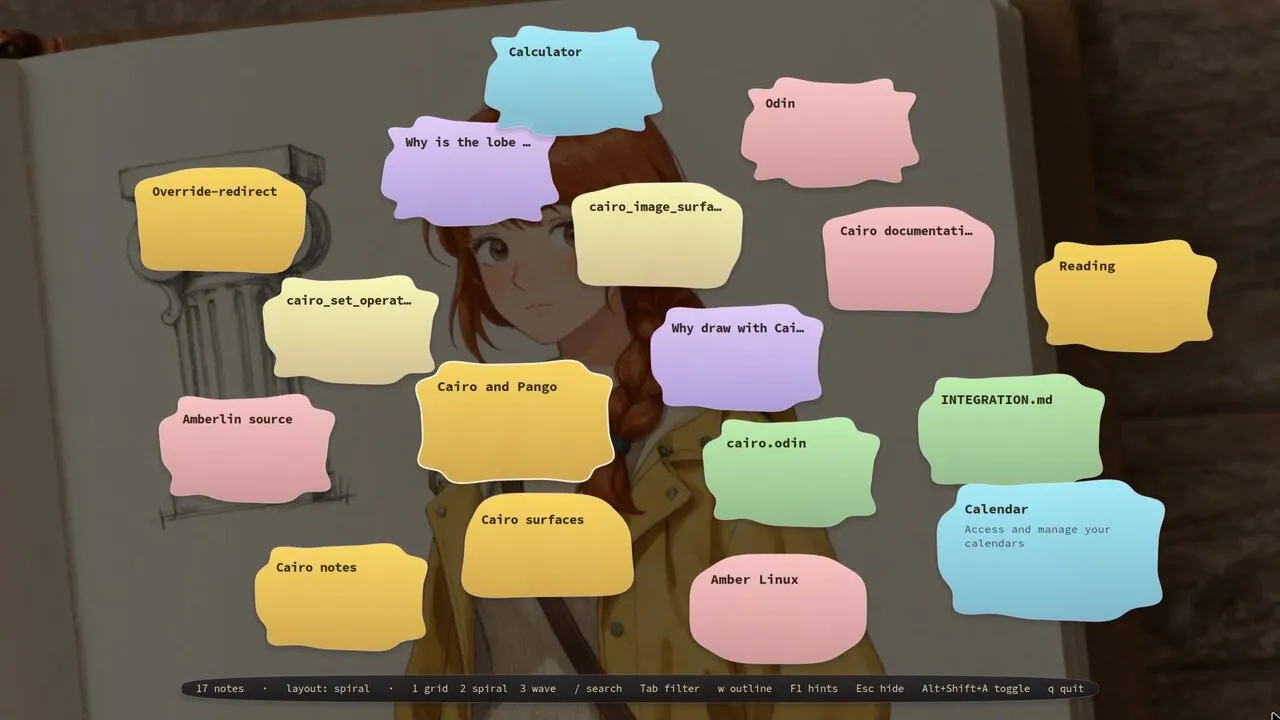
Press Alt+Shift+A and Copal covers the screen with what Ambrosia holds:
notes, bookmarks, clipboard entries, recent files, questions you asked
Amberlin and your pinned apps, each drawn as a note coloured by where it came from. The note under the pointer grows so it can
be read, and its neighbours make room. Press the key again, or Esc, and the
desktop is back.
The keys 1, 2 and 3 switch between three layouts: grid, spiral and wave.
/ searches the board, and with results up Tab narrows them to one kind of
entry. The arrow keys move
through the board with the selection held in the middle. w gives the notes
wobbly outlines, and F1 shows every key.
Copal only reads. It never changes what Ambrosia holds, and a note keeps the same shape here as it has on Amberlin’s board, because both draw it from the note’s id.
What it needs
An X11 session with a compositor, since the overlay is one transparent window drawn with Cairo; without a compositor it shows black. The hotkey is fixed for now. Copal and Amberlin never cover each other: showing one hides the other.
The name is the resin stage between tree sap and amber, still workable. Ambrosia is the store underneath; Copal is the surface you look at it through.
Install
Once the Amber Linux archive is set up (it takes three commands, on the packages page):
sudo apt install copal